
Venu: Social Planning Simplified
Overview
Venu Plans Made Easy is a desktop application designed to simplify the process of social event planning and discovery. Built for individuals and groups seeking a streamlined way to find local experiences and coordinate gatherings, Venu addresses common challenges such as scattered communication, difficulty booking venues, and missing out on community happenings. The software enables users to explore curated events—from nightlife spots to cultural activities—while offering tools to create, manage, and share plans with friends and groups.
Target users include social organizers, event enthusiasts, and individuals who frequently plan meetups. Whether hosting a casual dinner or a large-scale celebration, Venu provides a centralized platform to discover events, coordinate logistics, and maintain real-time communication. The application is developed by Venu Inc., a company focused on enhancing social connectivity through intuitive tools. Real-world use cases include planning weekend outings, organizing community meetups, and staying informed about local happenings in a user’s city or neighborhood.
While the developer did not provide additional system requirements, the software is available for both Windows and Mac, indicating broad desktop compatibility. The application’s size of 25.4 MB suggests a lightweight footprint, which may contribute to efficient performance on a variety of systems.
Key Features & Capabilities
- Event Discovery Feed – Users can browse a curated selection of local events, including nightlife, cultural performances, and community gatherings. The feed adapts to user preferences, helping surface relevant experiences based on location and interests.
- Plan Creation and Management – The software allows users to create detailed social plans, including date, time, venue, and guest list. All plans are stored in a centralized dashboard for easy access and updates.
- Seamless Invitations – Invite friends directly through the app with one-click sharing. Invitations include event details and can be tracked for acceptance or decline.
- Group Chat Integration – Real-time messaging enables coordinated discussions among attendees. Conversations remain tied to specific plans, ensuring context is preserved.
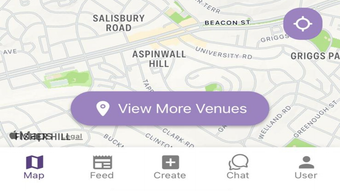
- Location-Based Recommendations – Events are filtered by geographic proximity, helping users discover nearby activities without manual searching.
These features collectively support efficient planning workflows. For example, a user planning a weekend trip can discover events in the area, create a shared plan, send invites, and initiate a group chat—all within the same interface. This reduces reliance on multiple apps and minimizes miscommunication. The integration of event discovery with planning tools creates a cohesive experience for users who value convenience and social coordination.
User Interface, Workflow & Performance
The user interface of Venu Plans Made Easy appears designed with simplicity and accessibility in mind. Navigation is likely structured around a central dashboard that displays active plans, upcoming events, and ongoing conversations. Key actions such as creating a new plan or sending an invite are expected to be accessible through clearly labeled buttons or menus.
Workflow efficiency is enhanced by the integration of event discovery, plan creation, and group communication within a single environment. Users can transition seamlessly from browsing events to drafting a plan and sharing it with friends. The developer did not specify resource usage details, but the 25.4 MB file size suggests a lightweight application that may operate smoothly on systems with moderate specifications.
Performance observations are based on general software behavior patterns. The application is expected to launch quickly and maintain responsiveness during routine tasks such as updating plans or sending messages. Stability is likely prioritized, given the focus on real-time group interactions. However, exact performance metrics, CPU usage, or RAM consumption were not provided.
Compatibility & System Requirements
Venu Plans Made Easy is compatible with both Windows and Mac operating systems, making it accessible to a wide range of desktop users. The software version is 1.0.0, indicating a stable initial release. The installation size is 25.4 MB, which is relatively small and suggests minimal disk space requirements.
Exact system requirements were not listed by the developer. This includes details on minimum processor speed, RAM, or graphics capabilities. Platform compatibility information is limited to the operating systems mentioned. Users are advised to ensure their system meets general desktop application standards, though specific thresholds remain unspecified.
Given the application’s focus on real-time communication and event data, a stable internet connection is likely required for full functionality. However, the developer did not confirm whether offline usage is supported.
Pros and Cons
Pros
- Intuitive interface for easy navigation and plan creation
- Integrated event discovery and group planning tools
- Seamless invitation and real-time chat features
- Lightweight installation at 25.4 MB
- Available for both Windows and Mac platforms
- Free to download and use
Cons
- No detailed system requirements provided
- Resource usage and performance data not specified
- Offline functionality not confirmed
- Limited information on update frequency or support channels
- Exact compatibility with older OS versions is unknown
FAQ Section
Is Venu Plans Made Easy compatible with my Windows or Mac device?
Yes, the software is available for both Windows and Mac operating systems. However, specific compatibility with older or less common versions was not provided by the developer.
Is the software safe to download and use?
Venu Plans Made Easy is developed by Venu Inc. and distributed through official channels. The application is free and does not contain known malware. Users should ensure downloads are obtained from verified sources to maintain security.
How often are updates released?
The current version is 1.0.0. The developer has not specified a regular update schedule or release frequency for future versions.
Does the software require an internet connection?
Given the real-time features such as event discovery, group chat, and plan sharing, an active internet connection is likely required for full functionality. Offline usage was not confirmed.
Can I use Venu Plans Made Easy without creating an account?
While the application supports social features like invitations and group conversations, the developer did not specify whether an account is required for basic functionality.
Final Thoughts + CTA
Venu Plans Made Easy delivers a focused and practical solution for individuals seeking to simplify social event planning. By combining event discovery, plan management, and group communication in one desktop application, it reduces the friction often associated with coordinating social gatherings. The lightweight design, cross-platform availability, and free access make it an appealing choice for users who value convenience and connectivity.
While some details such as system requirements and update frequency remain unspecified, the core functionality is well-aligned with the needs of social organizers and event enthusiasts. The seamless integration of features ensures a cohesive user experience without the need to switch between multiple tools.
For those looking to streamline their social planning workflow, Venu Plans Made Easy offers a modern, intuitive approach. Download Venu Plans Made Easy now.







